Handling large data with R and Python
2026-01-16
Plan for today
- Motivation
- Introduction to lazy evaluation
- How to use Polars
- More advanced concepts
- Alternative tools
1. Motivation
Motivation
The use of big data in all disciplines is growing:
- full censuses
- genomics data
- mobile phone data
- and more…
Motivation
Usually, we load datasets directly in R (or Stata, or Python, or something else).
This means that we are limited by the amount of RAM1 on our computer.
We might think that we need a bigger computer to handle more data.
Motivation
But we can’t necessarily have a bigger computer.
And we don’t necessarily need a bigger computer in the first place.
Multiple tools exist for user-friendly large data handling:
- polars
- arrow
- DuckDB
- etc.
Motivation
But we can’t necessarily have a bigger computer.
And we don’t necessarily need a bigger computer in the first place.
Multiple tools exist for user-friendly large data handling:
- polars
- arrow
- DuckDB
- etc.
Polars
polars is a recent DataFrame library that is available in several languages:
- Python
- R
- Rust
- and more
Very consistent and readable syntax.
Built to be very fast and memory-efficient thanks to several mechanisms.
Polars
The main mechanism is called lazy evaluation.
The next section is language agnostic: it is based on concepts, not language features.
2. Introduction to lazy evaluation
Eager vs Lazy
Eager evaluation: all operations are run line by line, in order, and directly applied to the data. This is the way we’re used to.
Eager vs Lazy
Lazy evaluation: operations are only run when we call a specific function at the end of the chain, usually called collect().
### Lazy

# Get the data...
my_data = lazy_data
  # ... and then sort by iso...
  .sort(pl.col("iso"))
  # ... and then keep only Japan...
  .filter(pl.col("country") == "Japan")
  # ... and then compute GDP per cap.
  .with_columns(gdp_per_cap = pl.col("gdp") / pl.col("pop"))

# => you don't get results yet!

my_data.collect() # this is how to get results
Eager vs Lazy
Polars has both eager and lazy evaluation.
When dealing with large data, it is better to use lazy evaluation:
- Optimize the code
- Catch errors before computations
1. Optimize the code
The code below takes some data, sorts it by a variable, and then filters it based on a condition:
Do you see what could be improved here?
1. Optimize the code
The problem is the order of operations: sorting data is much slower than filtering it.
Let’s test with a dataset of 50M observations and 10 columns:
1. Optimize the code
There is probably a lot of suboptimal code in our scripts.
Most of the time, it’s fine.
But when it starts to matter, we don’t want to spend time thinking about the best order of operations.
Let polars do this automatically by using lazy evaluation.
1. Optimize the code
collect()
-> check the code
-> optimize the code
-> execute the code
Examples of optimizations (see the entire list):
- run the filters as early as possible (predicate pushdown);
- do not load variables (columns) that are never used (projection pushdown);
- cache and reuse computations
- and many more things
2. Catch errors before computations
Calling collect() doesn’t start computations right away.
First, polars checks the code to ensure there are no schema errors, i.e. check that we don’t do “forbidden” operations.
For example, pl.col("gdp") > "France" would return the following error before executing the code :
polars.exceptions.ComputeError: cannot compare string with numeric data
A note on file formats
We’re used to a few file formats: CSV, Excel, .dta. Polars can read most of them (.dta needs an extension).
When possible, use the Parquet format (.parquet).
Pros:
- large file compression
- no type inference (as in CSV for example)
- stores statistics on the columns (e.g. useful for filters)
Cons:
- might be harder to share with others (e.g. Stata doesn’t have an easy way to read/write Parquet)
3. How to use Polars
How to use Polars
Polars can be used in Python and in R:
- Python library
polars. This is developed directly by the creators of Polars.
R packages
polarsandtidypolars.polarsis an almost 1-to-1 copy of the Pythonpolars’ syntaxtidypolarsis a package that implements thetidyversesyntax but usespolarsin the background.- Those packages are not on CRAN.
- Both are maintained by volunteers (including myself).
How to use Polars
Workflow:
- scan the data to get it in lazy mode.
This only returns the schema of the data: the column names and their types (character, integers, …).
How to use Polars
Workflow:
- Write the code that you want to run on the data: filter, sort, create new variables, etc.
How to use Polars
Workflow:
- Call
collect()at the end of the code to execute it.
How to use Polars
Problem: you don’t know what the data looks like.
Solution: Use eager evaluation to explore a sample, build the data processing scripts, etc. but do it like this:
Use lazy evaluation to perform the data processing on the entire data.
Polars expressions
To modify variables, we chain Polars expressions:
4. More advanced concepts
4. More advanced concepts
- Custom functions
- Streaming mode
- Larger-than-memory output
- Plugins & the rest
Custom functions
Maybe you need to use a function that doesn’t exist as-is in Polars or in a plugin.
You have mainly three options:
- write the function using Polars syntax
- collect the data, convert it (to
pandasin Python or to adata.framein R), and use the function you need
- use a
map_function (e.g.map_elements()or.map_batches()), but this is slower (available only in Python).
Custom functions
Example: let’s write a custom function for standardizing numeric variables.
Streaming mode
Streaming is a way to run the code on data by batches to avoid using all memory at the same time.
This is both more memory-efficient and faster.
Using this is extremely simple: instead of calling collect(), we call collect(engine = "streaming").
Tip
The streaming engine will become the default in a few months so you will be able to simply call collect() without the engine argument.
Larger-than-memory output
Sometimes, data is just too big for our computer, even after all optimizations.
In this case, collecting the data will crash the Python or R session. Polars is not a panacea.
What are possible strategies for this?
Larger-than-memory output
- Reconsider whether you actually need all the data in the session
Maybe you can use aggregate values instead (e.g. district-level statistics instead of individual statistics).
Maybe you just want to export the data to another file: use sink_*() (e.g. sink_parquet()) instead of collect() + write_*().
Larger-than-memory data
- Eventually… just get a bigger machine
Plugins
Python only (for now)
Polars accepts extensions taking the form of new expressions namespaces.
Just like we have .str.split() for instance, we could have .dist.jarowinkler().
List of Polars plugins (not made by the Polars developers): https://github.com/ddotta/awesome-polars#polars-plugins
GIS and Polars
While there is demand for a geopolars that would enable GIS operations in Polars, this doesn’t exist for now.
For some time, this was blocked by Polars’ capabilities, but this is now technically possible.
You might expect some movement in geopolars in 2026.
Polars docs
To get more details:
5. Alternative tools
Alternative tools for data processing
There isn’t one tool to rule them all.
Polars is great in many cases but your experience might vary depending on your type of data or operations you perform.
There are other tools to process large data in R and Python.
Alternative tools for data processing
-
- also lazy evaluation and available in Python
- has geospatial extensions
- accompanying R package duckplyr (same goal as
tidypolarsbut uses DuckDB in the background) duckplyris supported by Posit (the company behind RStudio and many packages)
arrow: also has lazy evaluation but less optimizations than Polars and DuckDB.
Spark: never used but available in R and Python.
Tools for regressions
So far, the focus was on data processing but there are also tools to apply econometric methods to large data:
- fixest: very performant but requires all data to be loaded in the session (might be an issue with larger-than-memory data).
- dbreg: relatively new, run regressions on larger-than-memory data (disclaimer: I haven’t used it myself).
Conclusion
Conclusion (1/3)
Polars allows us to handle large data even on a laptop.
Use eager evaluation to explore a sample, build the data processing scripts, etc. but do it like this:
Use lazy evaluation to perform the data processing on the entire data.
Conclusion (2/3)
Which language to use (for Polars)?
- Python:
- Polars core developers focus on the Python library.
- This is where bug fixes and new features appear first.
- Very reactive for bug reports.
- R:
- Voluntary developers.
- We implement new features and bug fixes slightly later.
tidypolarsis available.
Conclusion (3/3)
There exists other tools using the same mechanisms, they are worth exploring!
In R, several packages provide the tidyverse syntax while running those more powerful tools under the hood: tidypolars, duckplyr, arrow, etc.
Case study: IPUMS census data (samples)
Data to use
- IPUMS:
- US Census data for 1850-1930 (per decade)
- 1% (or 5-10% in some cases) samples
About 19M observations, 96 variables
5GB CSV, 240MB Parquet (~ 21x smaller)
See the SwissTransfer link I sent you
Objectives
- Python
- set up the python project and environment
- install and load polars
- scan the data and read a subset
- perform a simple filter
- perform an aggregation
- explore expression namespaces
- chain expressions
- export data
- Same with R (both
polarsandtidypolars)
Python setup
Keeping a clean Python setup is notoriously hard:
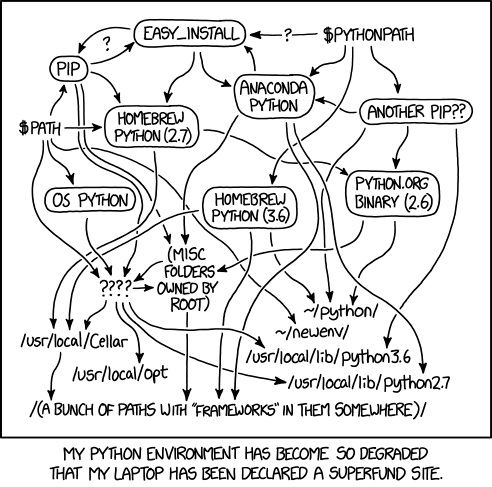
Python setup
Python relies a lot on virtual environments: each project should have its own environment that contains the Python version and the libraries used in the project.
This is to avoid conflicts between different requirements:
- project A requires
polars <= 1.20.0 - project B requires
polars >= 1.22.0
If we had only a system-wide installation of polars, we would constantly have to reinstall one or the other.
Having one virtual environment per project allows better project reproducibility.
Python setup
For the entire setup, I recommend using uv:
- deals with installing both Python and the libraries
- user-friendly error messages
- very fast
Basically 4 commands to remember (once uv is installed):
uv init my-project(oruv init) creates the basic files requireduv addto add a library to the environmentuv syncto update the venv (e.g. after adding a dependency or to restore a project)uv run file.pyto run a script in the project’s virtual environment
Python setup
The files uv.lock and .python-version are the only thing needed to restore a project.
You do not need to share the .venv folder with colleagues, they can just call uv sync and the .venv with the exact same packages will be created.
Python setup
For more exploratory analysis (i.e. before writing scripts meant to be run on the whole data), we can use Jupyter notebooks.
- create a new
demo.ipynbfile in the project folder - run
uv add ipykernelin the terminal - in the top right corner of the editor, you should see a “Select kernel” button
- if you don’t have the “Jupyter” extension installed, the “Select kernel” button will suggest you install it (and do it)
- select the one that corresponds to our virtual environment (for me, the path ends with “brussels_teaching_january_2026/.venv”)
Python setup
Automatically formatting the code when we save the file is a nice feature (not essential for today however).
If you want this:
- in the left sidebar, go to the “Extensions” tab (the four squares icon)
- search for “Ruff” and install it
- open the “Settings” (File > Preferences > Settings)
- search for “Format on save” and tick the box
- search for “Default formatter” and select “Ruff”
and you should be good to go!
R setup
Constraints:
you need R >= 4.3
polarsandtidypolarsare not on CRAN, soinstall.packages("polars")is not enough.
renv allows you to create a virtual environment in R.